

Every model on your network, in one list.
Accept the agreement to enable the download
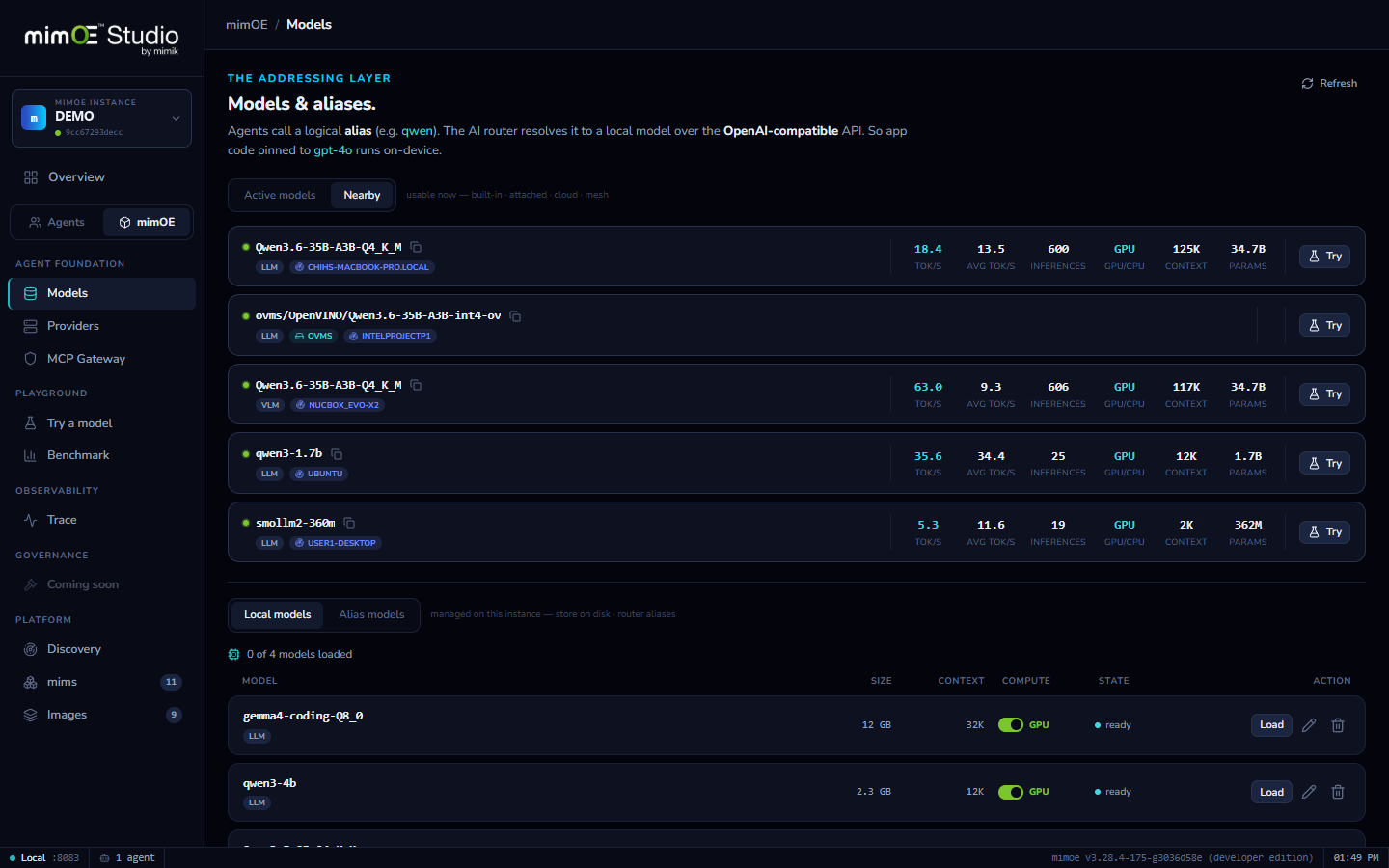
Run mimOE on two machines on the same network and they find each other. The workstation's 35B model appears on your laptop with no setup, no IPs, no YAML.
Nearby models get their own tab under Models and their own group in every model picker, tagged with the node they live on, one Try click from a conversation.
A nearby model's full name, {node-id}/{model}, is a real address. Agents and the Playground use it like any local model; the router does the network hop transparently.
The list is queried when you look at it. A node that goes offline disappears; a model loaded a minute ago is already there. What you see is what the mesh can serve right now.
A workstation with a big GPU, a laptop, a lab box: each runs mimOE. That's the whole setup; there is no step where you exchange IPs.
Instances on the same network discover each other automatically over link-local mesh discovery, each identified by a stable node ID.
Models → Nearby lists what every discovered node is serving right now, queried live when you open it, tagged with the node it lives on.
Hit Try, or address the model as {node-id}/{model} from an agent or your own app. The router carries the request across the mesh and streams the answer back.